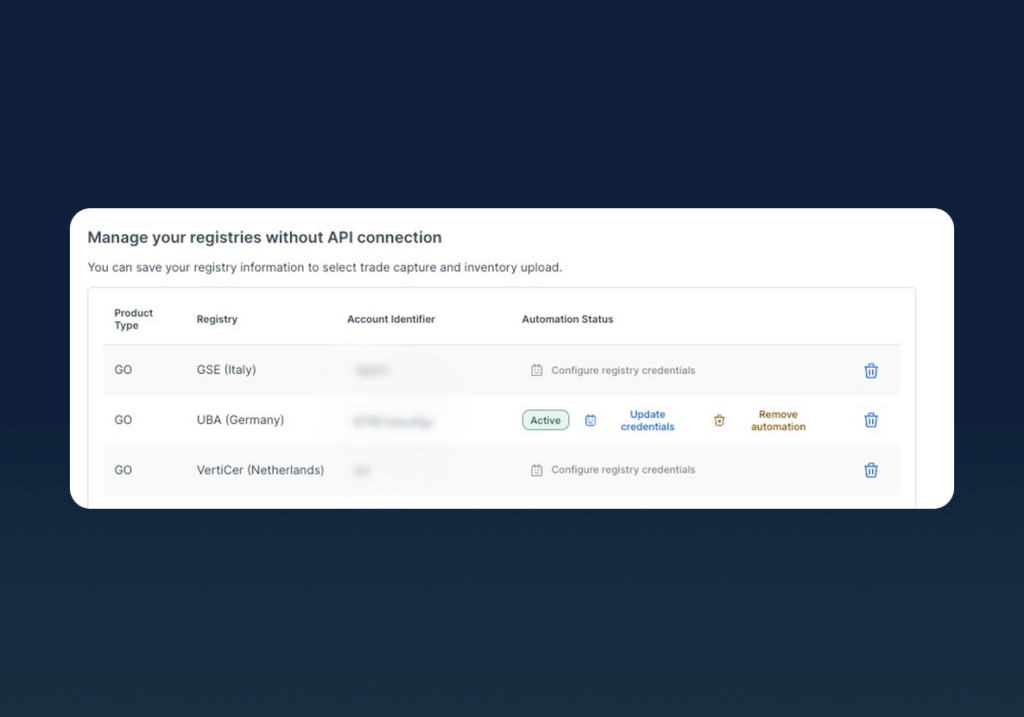
Registry Bridge in a nutshell
- Manual reconciliation of EAC portfolios across registries without an API is one of the most time-consuming and error-prone tasks for operations teams, and until now, there was no way to automate it.
- Registry Bridge connects non-API registries to CerQlar, automatically syncing your inventory and transactions without manual exports or side-by-side comparisons.
- Registry Bridge currently supports the HKNR (Germany) registry, with more to follow.
- Later in Q2 2026, actions you take in CerQlar—such as transferring or canceling EACs—are executed directly on the HKNR registry and instantly reflected in your records, eliminating the need to log into each registry every time you need to execute a transaction.
The challenge of managing EACs across multiple registries
If your team manages energy attribute certificates (EACs)—such as guarantees of origin—across multiple registries, you know how much manual work is involved in keeping your records reconciled with your registry accounts.
Most operations teams do this at least twice a month: exporting data from each registry, running side-by-side comparisons with their certificate inventory in a spreadsheet or ETRM, and manually updating records. And that’s before you factor in any errors, discrepancies, or missed transactions that need to be investigated.
On top of that, managing EAC transactions, such as settlement and cancellation, means logging into each registry separately and executing them one by one or in batches. Together, these manual workflows create a significant admin burden, cause data lags in your records, and increase the risk of errors.
Why we built Registry Bridge
When prioritizing features on our roadmap last year, we sat down with operations teams at both existing and prospective clients. This pain point of manually reconciling and managing EACs held on registries that don’t have an API came up time and time again.
When CerQlar was founded, only one registry had an API ready, and now over five years later, around 50% of registries still don’t have an API. This means that this pain of manual reconciliation is not going away any time soon.
We had already built workflows in CerQlar to make the manual reconciliation and settlement processes faster for registries with an API, so we set out exploring how to enable this for non-API registries too.
The first challenge was to build tools that could read data directly from clients’ accounts on non-API registries and feed it back into CerQlar. We then took it a step further by developing a two-way connection so users could perform actions on the registry without leaving the platform.
Registry Bridge is now available for the HKNR registry (Germany) to all users who request access, making CerQlar the first platform on the market to offer this capability for non-API registries.
How Registry Bridge works
Registry Bridge essentially provides an API-like functionality for registries that don’t have one. Once you have connected your registry account(s), Registry Bridge can:
- Read registry data: CerQlar connects to your registry account(s) that don’t have an API and syncs your inventory and transactions data.
- Automate reconciliation workflows: Advanced data matching tools ensure that registry data is matched to the correct certificates, and your CerQlar records are automatically updated based on the registry. Any errors or inconsistencies are flagged automatically.
- Perform actions on the registry from within CerQlar (available later in 2026): A two-way connection with the registry means that users can transfer, move or cancel certificates directly from the CerQlar platform, and those actions are instantly reflected in the relevant registry account.
All of this means that your records on CerQlar and your registry account(s) stay in sync without any duplicate entry or having to login to each registry account separately to check whether transactions have been completed or to execute a transaction.
What this means for operations and portfolio teams
Registry Bridge delivers time savings and accuracy gains across both the teams who manage EAC workflows day-to-day and those who rely on having a clear, unified picture of their portfolio to make decisions.
For operations teams, labor-intensive manual reconciliation processes, including data exports, file comparisons, and data updates, are now handled automatically. Discrepancies are flagged in real time, so issues are caught quickly rather than discovered weeks later.
For portfolio managers and traders, having an accurate, real-time view of the EAC inventory, delivery obligations, and portfolio position, supports better decisions on allocation and trading of EACs.
At the business level, Registry Bridge increases productivity by automating workflows, reduces exposure to reputational or financial risk by minimizing errors, and helps companies grow the size and profitability of their EAC portfolios without a proportional increase in operational costs or headcount.
Getting started with Registry Bridge
For existing CerQlar users, you can request access to Registry Bridge by contacting your Customer Success Manager directly or emailing [email protected] for more details.
If you’re new to CerQlar, Registry Bridge can be added to any CerQlar platform plan. Get in touch to see how our purpose-built platform can help you manage your EACs end to end, and how Registry Bridge works in practice.
Future plans for Registry Bridge
Registry Bridge currently supports read-only functionality for the HKNR registry, but CerQlar’s product team is already working on launching the action-taking capability and rolling it out for additional registries.
New functionalities will be added over time based on users’ evolving needs, registry updates, and emerging regulations. If you’d like to find out more about what’s on the product roadmap, you can contact us here.
Frequently asked questions
What is the difference between the CerQlar platform and Registry Bridge?
CerQlar platform is purpose-built for managing all types of EACs—GOs, I-RECs, REGOs, etc.—end to end, whereas Registry Bridge is a feature that is available within the CerQlar platform.
Who is Registry Bridge designed for?
Registry Bridge is built into the CerQlar platform, thus all users benefit from automated reconciliation between their GO inventory on CerQlar and relevant registry(ies). It mainly impacts operations teams (back and mid-office) as it saves them time by automating work that was previously manual as well as helping them avoid errors. However, it’s also beneficial for portfolio managers and trading teams who rely on accurate, real-time data to make allocation and trading decisions.
When is Registry Bridge available?
Registry Bridge is now available with read-only capabilities for the HKNR registry to all users who request access. The capability to perform actions on HKNR using Registry Bridge is in development and will be available for later in 2026. CerQlar is also working on connections with additional non-API-enabled registries in the near future.
I’m an existing CerQlar user. Is Registry Bridge included in my current plan?
Registry Bridge is an add-on and is not included in the core CerQlar subscription. Contact your Customer Success Manager for more details, or get in touch if you’re interested in learning more about CerQlar’s plans.
Which registries does Registry Bridge support?
Currently, Registry Bridge supports the HKNR (Germany) registry. We plan to add support for additional registries over time, prioritized based on client and market demand.
Does Registry Bridge work if my registry already has an API?
Yes. CerQlar’s existing Automated Reconciliation feature handles data syncing for registries that already have an API. Registry Bridge extends this capability to registries without an API, so the two features work in parallel to give you automated reconciliation coverage across your full portfolio.
I have more questions about how Registry Bridge works. Where can I find more information?
You can book a demo to speak with one of our team members, or reach out to your Customer Success Manager if you’re already a CerQlar client.
